
For a job offerworking name
Counter
A free web app for a phone or computer. Works offline.
One job offer in hand? Find out what to ask for, and whether it beats your current job.
You are always worth more.
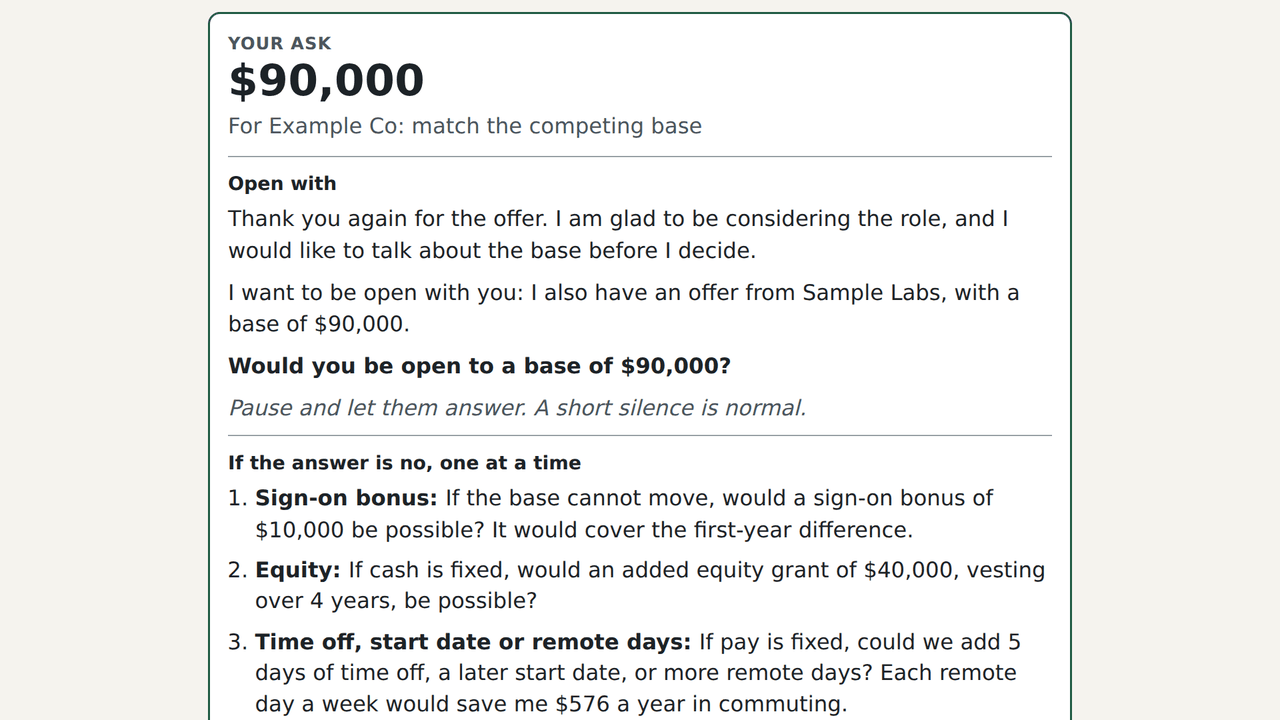
Counter is free and always will be. It has not launched yet, so this is the whole thing running here rather than a preview of something to buy.
Counter starts from one question: I got one offer. Is it better than my current job, and what should I ask for? It adds up the offer from the figures typed in, sets it next to the current job if there is one, and builds a starting ask, email and phone scripts, a Call Card and text practice from only those figures. Comparing up to three offers side by side is there too. Every feature is free, with no account, and everything stays on the device.
Who it's for
Anyone holding a job offer with a few days to answer, wondering whether it beats their current job and what to ask for. It's especially useful for hourly and non-tech roles and people changing fields, where benefits can flip the answer. No current job is needed to use any of it.
What it does
- Builds an ask only from facts entered in it. Another offer actually in hand, current pay, or a market figure typed in with its source. Nothing else.
- Has a plan for when base pay won't budge. A sign-on bonus, equity, time off or remote days, then a title or an early pay review, each with the amount worked out.
- Scripts and practice. Email and phone scripts in three tones, a Call Card, text practice against common recruiter replies, and a one-page summary to print.
- Checks its own writing. A fact check reads every sentence it writes and flags any number that wasn't entered, or any offer not actually held.
- Covers the logistics too (coming soon). When benefits start, how payroll works and when the first paycheck arrives, and the start date: the questions people forget to ask. This part isn't built yet.
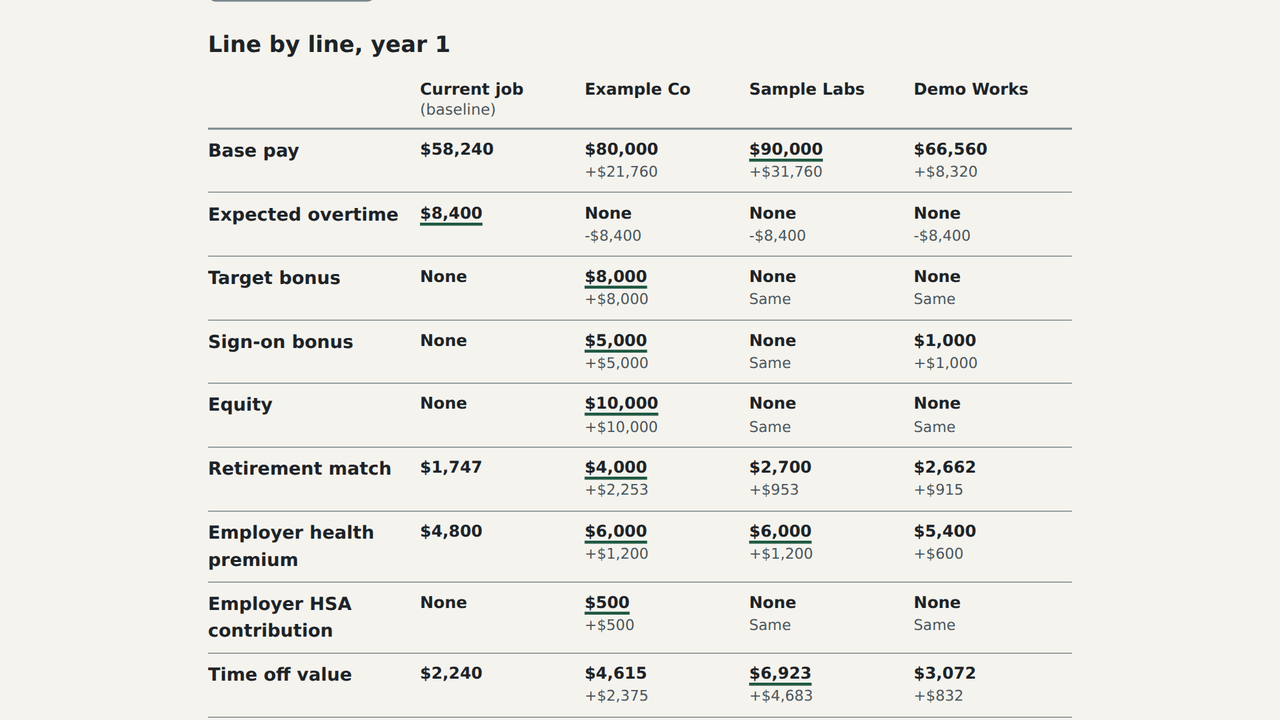
- Every part of the offer on one line. Pay (hourly with overtime, too), bonuses and their repay-if-you-leave windows, equity with vesting, the retirement match, the employer's share of health premiums, HSA money, time off at the daily rate, commute costs and remote stipends.
- Puts the offer next to the current job. Line by line, for year one and averaged over four years. The current job is optional, so the breakdown works the same without one.
- Finds the break-even. It works out the base pay or hourly rate that would make the offer equal the current job, or another offer.
- Compares more offers, too. Up to three offers side by side with the current job, line by line.
What it doesn't do
- No salary lookups.
- It never makes up a number.
- It can't know what an employer will do.
- It isn't legal or tax advice.
- No account.
A few more screenshots
 (larger view)
Questions
- Why not just use a spreadsheet?
- A spreadsheet only compares what someone thinks to type in. Counter asks for the parts people forget: the employer's share of health premiums, HSA money, the retirement match, bonuses with repay-if-you-leave windows, commute costs and time off at the daily rate. It does the math that's easy to botch, like hourly pay with overtime, vesting over four years, year one against the four-year average, and the break-even base. The main difference comes after the numbers: an ask built only from facts entered, a fallback plan for when base pay won't move, email and phone scripts, and a check that flags any number that wasn't entered.
- Do I upload my offer letter?
- No. The figures are typed in by hand, and they stay on the device.
- Will it tell me what I'm worth?
- No. Counter only works with numbers typed into it. Without an anchor, it suggests a modest step above the offer, which can be changed, and it says that's what it did.
- Does it work without a current job?
- Yes, all of it. The current job is optional. The offer gets the full breakdown on its own, and the ask can stand on another offer, a market figure or a modest step above the offer.
- Is any of it paid?
- No. Every feature is free, with no account and nothing to unlock.
What it keeps, and where
Nothing leaves the device. The numbers are typed in by hand, so the offer letter itself is never uploaded.
Goes online only for: Update check (not active in current builds); Rewording with a local language model (off until you turn it on).
Runs on, and what it'll cost
- Runs on
- Web app for phone, tablet and desktop browsers. Installable, and works offline after the first visit.
- Cost
- Free, all of it. No account.
- Name
- In app stores it will be listed as Counter: Offer vs Current Job.
Gross, pre-tax estimates from the figures entered. Not financial, tax, legal or employment advice.